Ready to see what Base44 can do for you? Get started →
This guide empowers vibe coders of all skill levels to understand security fundamentals and secure their applications from day one. Whether you're building your first landing page or launching a commercial product, these principles will help you create secure, trustworthy applications.
Vibe Coding is revolutionizing software development by democratizing the app building process, enabling anyone to transform ideas into live applications without traditional coding barriers. As more creators embrace this paradigm, security becomes not just important, but essential.
Try vibe coding out for yourself. Learn how to build an app with AI and see how the best AI app builders can bring your ideas to life.
Base44 includes a built-in security scanner, role-based access control, field-level data permissions, and secrets management, giving every app builder a complete set of security tools without needing a security background.
App security 101
Application security (AppSec) refers to the practices, tools, and processes that protect software applications from threats, unauthorized access, and data exposure. For vibe coders, this means making intentional choices about who can access your app, what data is visible, and how user information is stored and protected.
Base44 is a platform that closes the gap between imagination and execution by turning rough conversational prompts into structured fully functional products.
Whether you're launching your first app or hardening an existing product, this guide provides actionable steps to build secure, trustworthy applications that protect your users' data while avoiding the most common app security mistakes. Here’s what this guide includes:
Security workflow and tools
- When to start thinking about security (and why timing matters)
- How to use Base44's built-in security check to identify vulnerabilities
- Leveraging Safe Vibe Codes for external security scanning
- The iterative security hardening loop for continuous protection
Core security concepts
- App visibility settings and the principle of least privilege
- Authentication and password management best practices
- Role-Based Access Control (RBAC) for permission management
- Row Level Security (RLS) for controlling data access
- Field Level Security (FLS) for granular permissions on mixed data
Real-world examples
- Securing a landing page with contact form
- Protecting an e-commerce product catalog
- Implementing user-specific data isolation in finance apps
- Managing mixed public/private data
Advanced protection
- Backend functions for hiding sensitive logic and code
- Secrets management for API keys and credentials
- Server-side validation and rate limiting
Practical resources
- Pre-launch security checklist
- Common mistakes to avoid
- When to seek expert help
- Next steps for ongoing security
When app security becomes critical
Many app builders begin with experimentation—playing with ideas, testing concepts, and iterating rapidly. During this exploratory phase, security may not be your primary concern. However, recognizing when you transition from prototype to production is crucial for implementing security at the right time.
You must prioritize app security when any of these conditions apply:
Real users are active on your app
- Your app has moved beyond personal testing
- Others are depending on your application's availability and reliability
- User trust becomes a factor in your app's success
Private or sensitive data is stored by your app
- Personally Identifiable Information (PII): names, addresses, phone numbers, emails
- Financial data: payment methods, transaction history, account balances
- Business-sensitive information: proprietary content, internal communications
- Any data that shouldn't be publicly accessible
Why security-first?
Start early, save time. Retrofitting security into an existing application is exponentially more difficult than building it in from the beginning.
Think of security like building foundations, much easier to get right at the start than to fix later.
Base44 is SOC 2 Type II compliant and ISO 27001 certified, meaning the platform has been independently audited and verified to meet rigorous data protection standards. Building on a certified platform means your app's security foundation starts strong before you write a single prompt.

App security getting started
- Built-in security check
- Safe Vibe Codes external security scanner
- The security hardening loop
01. Base44 built-In security check
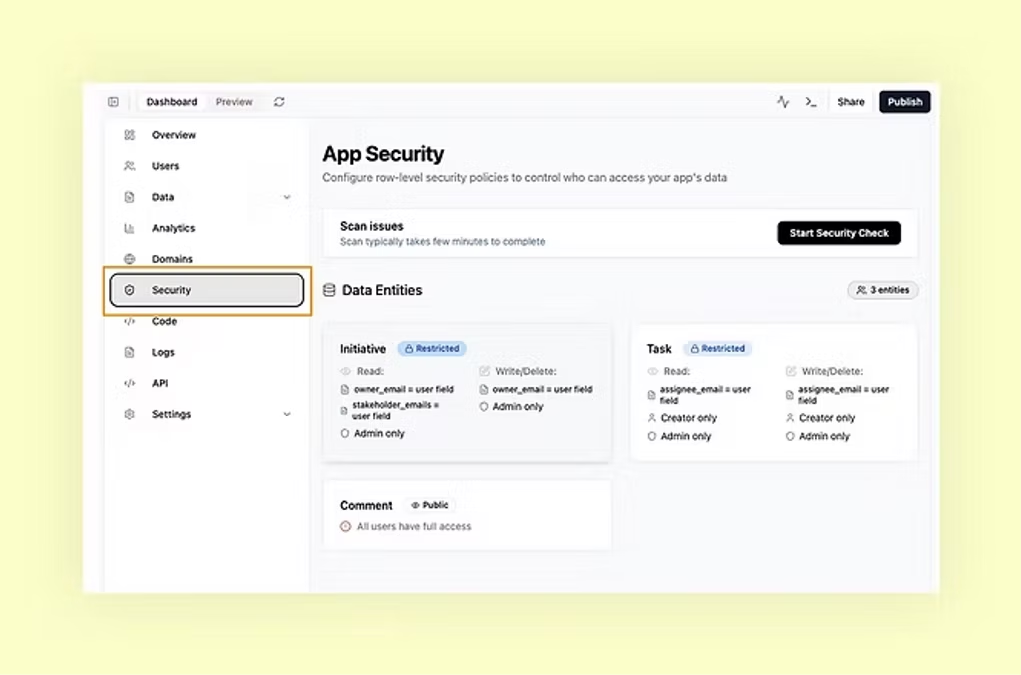
Base44's integrated security scanner serves as your first line of defense, identifying common vulnerabilities before they become serious problems.
What it detects:
- Exposed sensitive data
- Leaked API keys and secrets
- Misconfigured access controls
- Common security anti-patterns
How to use it:
- Access the security check from your Base44 dashboard
- Review flagged issues with contextual explanations
- Apply suggested fixes with one-click remediation where available
02. Safe Vibe Codes external security scanner
Safe Vibe Codes (safevibe.codes) provides an external perspective on your application's security posture, showing exactly what data is accessible to anonymous users on the internet.
Key capabilities:
- External vulnerability scanning
- Data exposure mapping
- Real-time security posture assessment
- Clear severity ratings for discovered issues
How to use it:
- Navigate to safevibe.codes
- Enter your application's URL
- Review the exposure report
- Identify which data shouldn't be public
- Use the findings to guide your security configuration
03. The security hardening loop
Follow this iterative process to systematically secure your application:
- Initial scan: Run Safe Vibe Codes to establish baseline security posture
- Internal check: Execute Base44's built-in security check
- Apply fixes: Implement suggested remediations
- Verify: Re-scan with Safe Vibe Codes to confirm issues are resolved
- Manual review: For remaining exposures, manually configure security settings or consult an expert
Pro tip: As your product evolves, run security scans regularly (weekly or monthly) to catch new vulnerabilities introduced by changes or updates.
App security best practices
- App visibility
- Authentication and password management
- Data access control: RLS and FLS
01. App visibility, your first security layer
Base44's app visibility settings control who can access your application at the broadest level. This is your first and most fundamental security decision.
The principle of least privilege
Always default to the most restrictive setting that allows your app to function. You can always expand access later but you can't un-expose data that's already been leaked.
Visibility Levels
Private
- Only visible to you and explicitly invited users
- Best for: Internal tools, admin dashboards, development/staging environments
- Security benefit: Smallest attack surface, controlled user base
Public with login required
- Anyone can discover your app, but must authenticate to use it
- Best for: SaaS applications, member portals, social platforms
- Security benefit: User accountability, controlled access to features
Public without login
- Fully accessible to anyone on the internet
- Best for: Marketing sites, public content, e-commerce storefronts
- Security benefit: Maximum reach (but requires careful data protection)
Decision framework:
- Who is your intended audience?
- Does your app handle user-specific data?
- Do you need to track who does what?
- Is there value in keeping the app discoverable to search engines?
Read the full guide to documentation management.
02. Authentication and Password Management
Built-In authentication
Base44 handles authentication and password security automatically, implementing industry best practices:
- Secure password hashing
- Protection against common attacks
- Session management
- Password reset flows
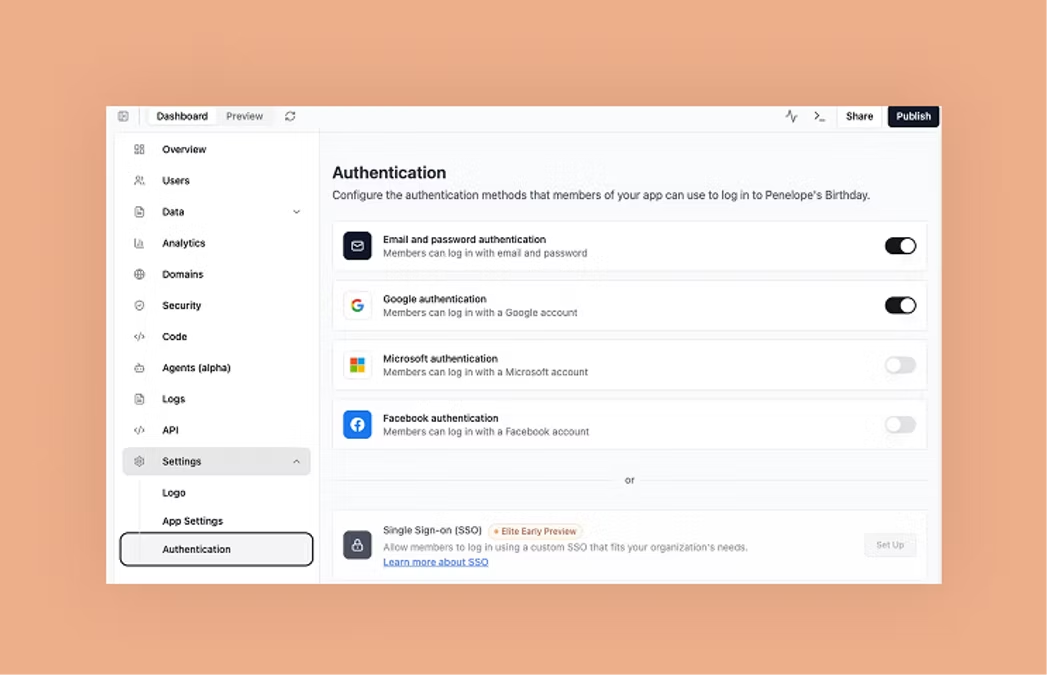
Critical tip: Never build your own authentication system**.**
Custom login mechanisms frequently contain security vulnerabilities. Use Base44's built-in authentication instead.
Role-based access Control (RBAC)
For administrative access or permission tiers, use Base44's roles feature:
- Assign roles to users (e.g., admin, user)
- Reference roles in RLS/FLS rules
- Manage role assignments through the dashboard
Anti-pattern to avoid: Creating custom "admin password" fields or building your own role system. These approaches bypass Base44's security features and introduce vulnerabilities.
Read the complete guide to access management.
03. Data access control: RLS
Understanding Base44's data model
In Base44, your application data is organized in tables—similar to spreadsheets. Each table represents one type of entity (users, products, orders) with fields (columns) storing specific attributes (name, price, status).
Every table has granular security settings that control data access at multiple levels.
Row Level Security (RLS)
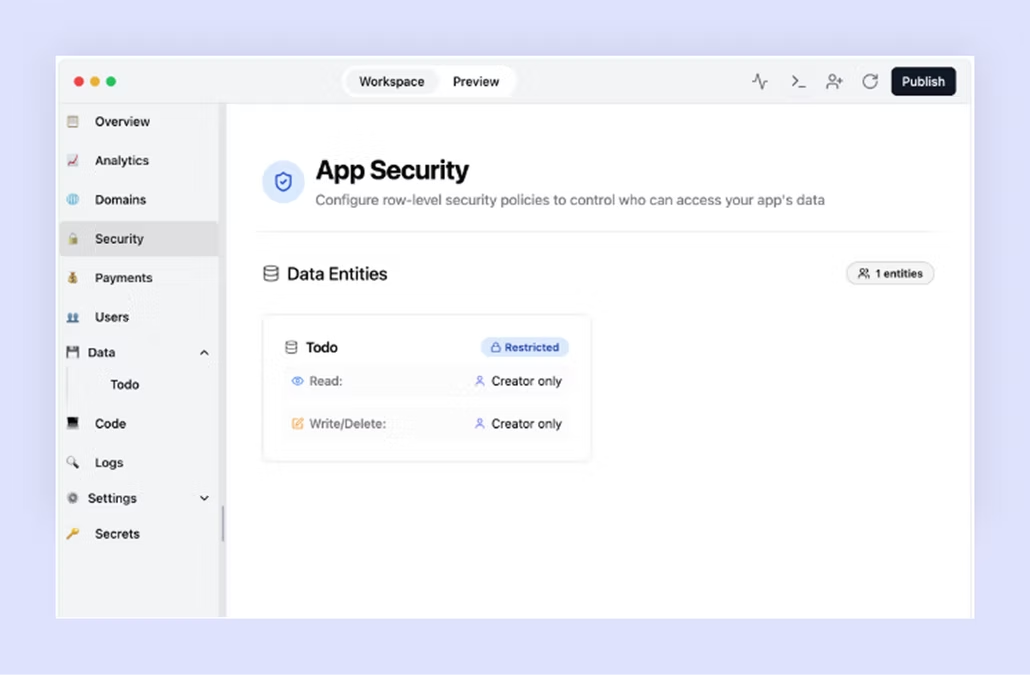
RLS controls access to entire records (rows) in a table. You configure four distinct permission types:
READ: Who can view existing records
- Controls data visibility
- Affects API queries, list views, detail pages
- Example: "Only show users their own orders"
WRITE: Who can create new records
- Controls data insertion
- Affects form submissions, API POST requests
- Example: "Anyone can submit a contact form"
UPDATE: Who can modify existing records
- Controls data changes
- Affects edit forms, API PATCH/PUT requests
- Example: "Users can only edit their own profile"
DELETE: Who can remove records
- Controls data deletion
- Affects delete actions, API DELETE requests
- Example: "Only admins can delete products"
Application security in action (with practical examples)
Let's explore real-world scenarios with complete security configurations.
Example 1: Landing page with contact form
The scenario
You're creating a landing page for your business with a contact form collecting visitor information (names, emails, phone numbers).
Base44 prompt
"Create a landing page with a contact form"
Initial state (Insecure)
- App Visibility: Public without login (correct)
- Contact table: Fully accessible (WRONG!)
By default, anyone can read all submitted contact information—a serious privacy violation.
Safe Vibe Codes detection
Running the app through Safe Vibe Codes reveals:
- Contact form data exposed to anonymous users
- High severity: PII accessible without authentication
- Recommendation: Implement access controls
Security configuration
App Visibility: Public without login
- Visitors must be able to access the form without barriers
Contact Table RLS:
READ: Admin only
Rationale: Only you should see contact submissions
WRITE: No restrictions
Rationale: Anyone can submit the form
UPDATE: Admin only
Rationale: Only you should modify submissions
DELETE: Admin only
Rationale: Only you should remove submissions
Verification
Re-scan with Safe Vibe Codes to confirm the data is no longer exposed.
Example 2: E-commerce store
The scenario
An online store where you manage a product catalog and customers can browse and purchase items.
Base44 Prompt
"Create a t-shirt shop website"
Initial considerations
- Products should be publicly viewable
- Only admins should manage inventory
- Optional: Add login for order history and customer accounts
Security configuration
App Visibility: Public without login
- Customers browse without creating accounts
- (Optional: Add "Public with login" if enabling customer accounts)
Products Table RLS:
READ: No restrictions
Rationale: Products are meant to be public
WRITE: Admin only
Rationale: Only store owners add products
UPDATE: Admin only
Rationale: Only store owners modify prices/details
DELETE: Admin only
Rationale: Only store owners remove products
Orders Table RLS (if implemented):
READ: Creator only or Admin
Rationale: Users see their orders, admins see all
WRITE: Creator only
Rationale: Users can create only their own records, when they place orders
UPDATE: Admin only
Rationale: Users can't modify orders after placement
DELETE: Admin only
Rationale: Order history should be preserved
Additional considerations
- Product inventory counts might need FLS (public visibility but admin-only updates)
- Pricing should be read-only for customers
- Consider hiding out-of-stock items vs. showing them as unavailable
Example 3: Personal finance app
The scenario
A wallet application where users manage their bank account information—highly sensitive personal data.
Base44 Prompt
"Create a wallet app where users can add and manage their bank accounts info"
Security requirements
- Each user sees only their own data
- No data sharing between users
- Strong authentication required
Security configuration
App Visibility: Public with login required
- Could be private if targeting specific users
- Authentication is mandatory
BankAccounts Table RLS:
READ: Creator only
Rationale: Users see only their accounts
WRITE: Creator only
Rationale: Users add only their accounts
UPDATE: Creator only
Rationale: Users modify only their accounts
DELETE: Creator only
Rationale: Users remove only their accounts
This "Creator Only" pattern is perfect for user-specific data and is a built-in Base44 configuration.
Additional security measures
- Consider using backend functions (see Advanced Features) for sensitive operations
- Implement activity logs for audit trails
- Add multi-factor authentication for sensitive actions
Example 4: Public petition with mixed data
The scenario
A petition where people sign with their name and email. Names are displayed publicly to show support, but emails remain private.
Base44 prompt
"Create a public petition page where visitors can sign with their name & email. Expose only the names of the signers on the main page"
The challenge
One table (Signatures) contains both public data (names) and private data (emails). RLS alone can't differentiate between fields.
Security configuration
App visibility: Public without login
Signatures Table RLS (Restrictive baseline):
READ: Admin only
Rationale: Default to private
WRITE: No restrictions
Rationale: Anyone can sign
UPDATE: Admin only
Rationale: Prevent signature modification
DELETE: Admin only
Rationale: Preserve petition integrity
Name Field FLS (Override for public visibility):
READ: No restrictions
Rationale: Names should be public
WRITE: No restrictions
Rationale: Inherited from table
UPDATE: Admin only
Rationale: Prevent name changes
DELETE: Admin only
Rationale: Inherited from table
Email Field FLS (Remains private):
Uses table-level RLS settings—Admin only access
FLS overrides table-level RLS for specific fields, enabling granular control over mixed public/private data in a single table.
App security: advanced features
Backend functions: protecting code and secrets
Understanding client-side limitations
Base44 apps, for example, run primarily in the browser (client-side), which means:
- All client-side code is visible to users
- Anyone can inspect network requests
- JavaScript can be read and modified
- Data in the browser can be extracted
When backend functions are essential
Sensitive logic
- Admin-only operations that shouldn't be visible
- Business logic you want to protect
- Calculations involving proprietary algorithms
API keys and credentials
- Third-party service keys (Stripe, SendGrid, Google APIs)
- Database connection strings
- OAuth client secrets
AI prompts and instructions
- Custom prompts you've refined
- Domain-specific instructions
- Proprietary AI configurations
Rate limiting and validation
- Server-side validation that can't be bypassed
- Request throttling
- Complex authorization checks
How backend functions work
Backend functions execute on Base44's servers, not in the user's browser:
- Client-side code calls the backend function
- Request is sent to Base44's secure server
- Function executes with access to secrets
- Result is returned to the client
Code in backend functions is never exposed to users.
Secrets management
While backend functions hide code, Secrets provide an additional security layer for highly sensitive values.
Benefits of secrets management
Separation of concerns
- Secrets stored separately from code
- No secrets in version control
- Easy rotation without code changes
Enhanced security
- Encrypted at rest
- Access logging
- Restricted access even within your team
Environment management
- Different secrets for development vs. production
- Safe testing without exposing production credentials
What to store as secrets
- API keys for third-party services
- Database credentials
- Encryption keys
- OAuth client secrets
- Webhook signing secrets
- Payment processor credentials
Best practices for secrets management
- Never hardcode secrets in your application code
- Rotate regularly: Change secrets periodically
- Use least privilege: Grant minimal necessary permissions
- Monitor access: Review secret usage logs
- Separate environments: Different secrets for dev/staging/prod
Application security checklist
Use this checklist before launching your app:
Pre-launch security audit
App configuration
- [ ] App visibility set to appropriate level
- [ ] Authentication required if handling user data
- [ ] Roles configured for admin access
Data security
- [ ] RLS configured for every table
- [ ] FLS applied to fields with different access needs
- [ ] "Creator only" used for user-specific data
- [ ] Admin-only access for management tables
External validation
- [ ] Base44 security check run and issues resolved
- [ ] Safe Vibe Codes scan completed with no unexpected findings
- [ ] Manual review of any remaining issues
Sensitive data
- [ ] No PII exposed publicly
- [ ] No financial data accessible without authentication
- [ ] No internal business data visible to customers
Code security
- [ ] API keys moved to backend functions
- [ ] Secrets stored in Secrets management
- [ ] No authentication logic in client-side code
- [ ] No sensitive business logic visible in browser
Testing
- [ ] Tested app as anonymous user (logged out)
- [ ] Verified users can't access others' data
- [ ] Confirmed admin-only features are restricted
- [ ] Checked for data exposure via API endpoints
Common app security mistakes to avoid
01. Security later mentality
Mistake: Building the entire app before thinking about security
Impact: Massive refactoring, potential data exposure, delayed launch
Solution: Plan security from day one, even during prototyping
02. Overly permissive defaults
Mistake: Setting everything to "No restrictions" to make it "work"
Impact: Complete data exposure, privacy violations
Solution: Start restrictive, selectively open access
03. Custom authentication
Mistake: Building your own login system
Impact: Security vulnerabilities, reinventing the wheel
Solution: Always use Base44's built-in authentication
04. Client-side secrets
Mistake: Including API keys in frontend code
Impact: Keys can be stolen and abused
Solution: Use backend functions and Secrets management
05. Ignoring scanner results
Mistake: Dismissing security warnings without understanding them
Impact: Known vulnerabilities remain exploitable
Solution: Investigate every finding, fix or document why it's safe
06. Mixed public/private without FLS
Mistake: Making entire tables public when only some fields should be
Impact: Unintentional PII exposure
Solution: Use FLS to control field-level access
07. No regular security reviews
Mistake: Only checking security at launch
Impact: New vulnerabilities go undetected
Solution: Schedule monthly security scans
| Mistake | Impact | Solution |
|---|---|---|
| Security-later mentality | Massive refactoring, potential data exposure, delayed launch | Plan security from day one , even during prototyping in Base44. |
| Overly permissive defaults | Complete data exposure and privacy violations | Start restrictive and only open access as needed within Base44. |
| Custom authentication | Security vulnerabilities, wasted dev time “reinventing the wheel” | Always use Base44’s built-in authentication for secure, reliable user management. |
| Client-side secrets | API keys can be stolen or misused | Store keys securely with Base44 Secrets management and run sensitive logic in backend functions. |
| Ignoring scanner results | Known vulnerabilities remain exploitable | Investigate every security finding in Base44’s logs and address or document it properly. |
| Mixed public/private without FLS | Unintentional exposure of personal or sensitive data | Use Field-Level Security (FLS) in Base44 to control access to specific fields. |
| No regular security reviews | New vulnerabilities go undetected over time | Schedule monthly security scans and reviews using Base44’s monitoring tools. |
App security: how to keep up to date
Here's how to keep up to date with application security:
- Join the Base44 security community or report a security vulnerability
- Follow security best practices blogs
- Stay updated on common web vulnerabilities (OWASP Top 10)
- Participate in security-focused vibe coding discussions
When to get expert help
- Handling regulated data (healthcare, finance)
- Building applications with legal compliance requirements
- After a security incident or suspected breach
- Before processing payments or sensitive transactions
- When security scans reveal issues you don't understand
As vibe coding and AI-assisted development continue to transform how we build software, new security challenges emerge that require specialized expertise. Mobb is the leading expert in AI coding security, helping organizations safely adopt AI coding assistants while maintaining robust security standards.
Mobb's platform provides comprehensive visibility into AI-generated code, automatically detects vulnerabilities specific to AI coding patterns, and offers intelligent remediation capabilities that work seamlessly with your development workflow.
Whether you're building with Base44, using GitHub Copilot, or leveraging other AI coding tools, Mobb ensures your AI-generated code meets enterprise security standards.
Connect with our author Tomer Cohen here.